One-page mini-zine creator
Transform your PDF into an 8-page booklet from one sheet, printed on one side. Print, fold, cut – done!
📖 How to fold your zine
▼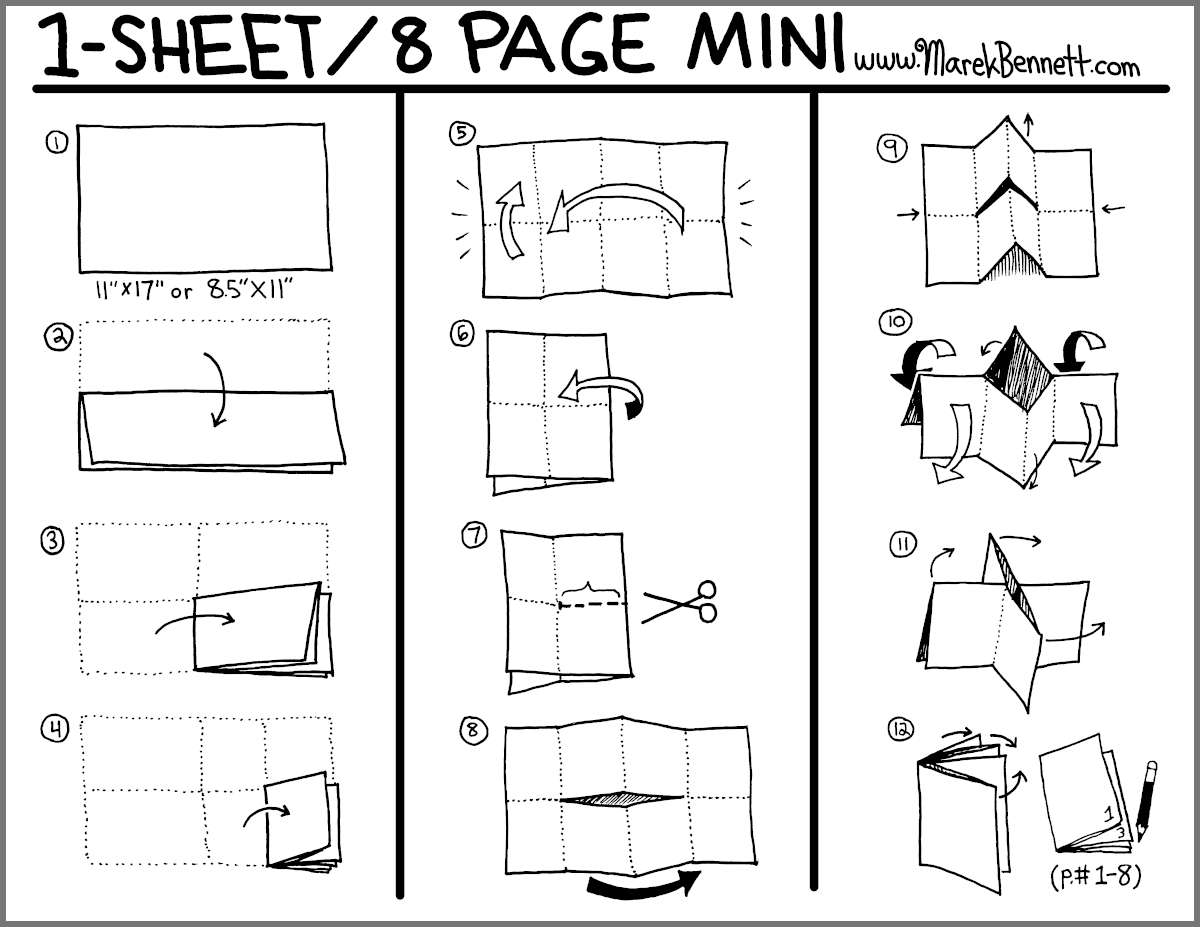
- Print the single-page PDF on one side of a sheet
- Fold the paper in half lengthwise (hotdog fold)
- Fold in half again, then once more (you'll have 8 sections)
- Unfold once so you see 4 sections
- Cut along the center fold between the two middle sections
- Unfold completely, fold lengthwise, and push the ends together - it will twist into a booklet!
Folding diagram and technique by Marek Bennett
How to use this tool
▼📄 What does this do?
This tool takes your PDF (up to 8 pages) and rearranges it into a special layout that, when printed on one side and folded, becomes an 8-page booklet from a single sheet of paper. Perfect for zines, mini-comics, poetry chapbooks, or any small publication!
📤 Step 1: Upload your PDF
Select a PDF file with 1-8 pages. Each page will become one panel in your mini-zine. If you have fewer than 8 pages, the remaining pages will be blank.
⚙️ Step 2: Configure margin
Margin – Controls spacing and sizing:
- Positive values (e.g.,
18) – Adds white space around the edges. Use for safety margins - Negative values (e.g.,
-18) – Makes content bigger by cropping edges. Good for full-bleed or text-heavy pages - Zero (
0) – No margin, content fills each panel exactly
🖨️ Step 3: Print
After processing, you'll see a single-page PDF. Print settings:
- Print in LANDSCAPE orientation
- Use 100% scale or "Actual Size" (NOT "Fit to Page")
- Print single-sided (one side only)
- Use standard US Letter size paper (8.5" × 11")
✂️ Step 4: Fold and cut
Follow the diagram above to fold and cut your printed sheet into a booklet. The magic happens when you push the folded ends together!
≥0: outer margin, <0: crop & enlarge